Web Browser Control
First published at vikramdotnet.blogspot.com under the name Vikram Gorla.
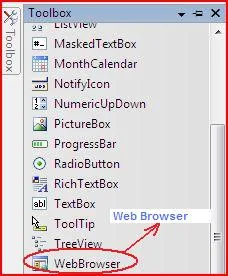
Web Browser Control is a Handy Component , which can be used for website navigation, data extraction, navigation event handling, event overriding, etc,… This component is available in windows application of .Net
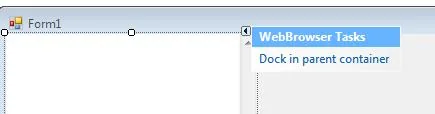
 You can Fill your form the form by this browser, by Selection Option Dock in Parent Container.
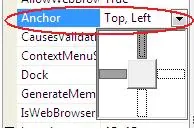 Or else you can set the bounds with anchor property in Web Browser Properties.
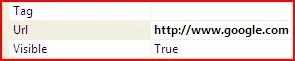
To Specify the Default Url, to be loaded when the web browser is loaded, the Url propety is set in the properties. For the page to be blank specify about:blank in the Url property
Some websites will have same ignorable script errors which will pop up as  an error during navigation , which can be avoided using ScriptErrorsSupressed Property and Scroll bars can be enabled using ScrollBarsEnabled Property
Major Event and Methods of Web Browser :
- Public Sub Navigate(ByVal urlString As String)
Summary:
Loads the document at the specified Uniform Resource Locator (URL) into the System.Windows.Forms.WebBrowser control, replacing the previous document.
- Public Function GoForward() As Boolean
Summary:
Navigates the System.Windows.Forms.WebBrowser control to the next page in the navigation history, if one is available.
- Public Function GoBack() As Boolean
Summary:
Navigates the System.Windows.Forms.WebBrowser control to the previous page in the navigation history, if one is available.
- Public Overrides Sub Refresh()
Summary:
Reloads the document currently displayed in the System.Windows.Forms.WebBrowser control by checking the server for an updated version.
- Public Sub Stop
Summary:
Cancels any pending navigation and stops any dynamic page elements, such as background sounds and animations.